

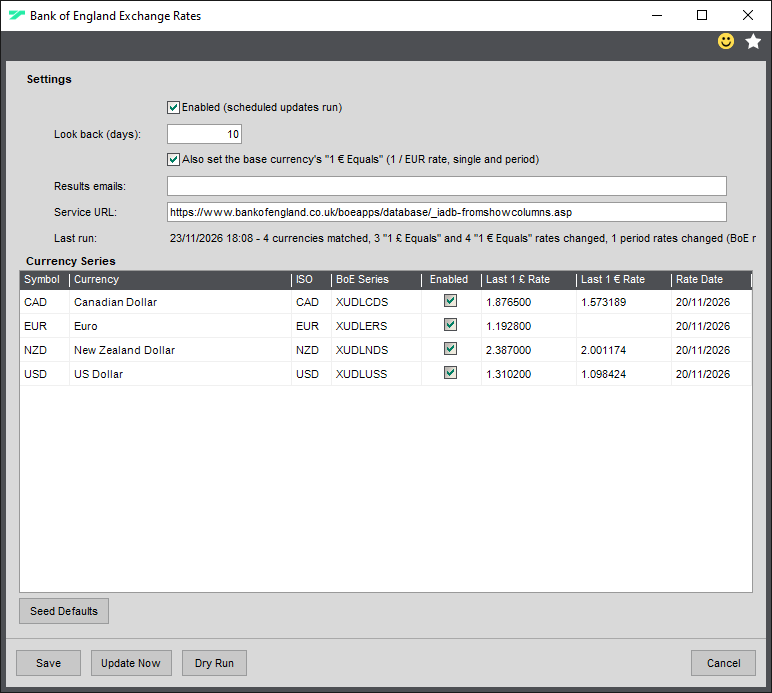
Our Bank of England add-on sets Sage 200’s exchange rates from the Bank of England’s daily spot rates. Nobody has to look up the day’s rates and type them into Sage because the add-on fetches them and sets every currency you have mapped in one pass.
Sage holds two rates for every currency - what one pound buys and what one euro buys. The add-on sets both and works each euro rate out from the Bank of England’s own euro rate so the two always agree. Rates are saved the way Sage’s own Currencies and Exchange Rates screen saves them so View Currency History records every change. A currency Sage will not let you amend such as one fixed to the euro is left alone.
Its settings are on one screen called Bank of England Exchange Rates. Seed Defaults adds a row for every Sage currency that has a known Bank of England series and series are ready for 26 currencies from the US dollar and euro to the yen and rand. You can switch a currency off or point it at a different series.
Dry Run fetches the rates and shows what would change currency by currency without writing to Sage. Update Now runs the update by hand. A Windows scheduled task runs it for you while Enabled is ticked and emails the results to the people you choose. Each run looks back over recent days so weekends and bank holidays still find the latest rate.
The add-on is for Sage 200 companies whose base currency is sterling. The Bank of England’s rates are a public service with no account or API key to set up.
See our Bank of England exchange rates page or talk to us if you still key exchange rates into Sage 200.