
Archiving
Maintain optimal Sage 200 performance with automated overnight archiving, shifting that historic information into cold storage to keep your live data instantly accessible.
Automated out-of-hours archiving for Sage 200
As your business grows, Sage 200 accumulates years of transactional history - completed orders, historical inventory movements etc. that gradually degrades system performance. Slower query responses, extended report generation times, and difficulty locating recent transactions become frustrating daily obstacles that impact productivity and decision-making speed. Our archiving software addresses this challenge by relocating historical data that no longer requires immediate access, maintaining system responsiveness and ensuring your team can quickly find the information they need without wading through years of archived transactions.
The entire archiving process operates automatically in the background, typically scheduled to run during off-peak hours when your team isn't using the system, ensuring zero disruption to daily operations. Data is archived safely and methodically according to your requirements, removing the performance burden from your live system while preserving complete access to historical records when audits, queries, or analysis require them. Your team arrives each morning to a faster, more responsive Sage 200 system without any manual intervention, maintenance windows, or operational downtime - the archiving happens silently and reliably while your business sleeps, delivering continuous performance optimization without demanding any attention from your IT resources or operational staff
Why archiving?
Help your business run better
Performance
Years of accumulated data slows down Sage 200's responsiveness, causing longer query times, delayed report generation, and frustrating lags during routine operations. Archiving data that's no longer needed significantly improves system speed, allowing your team to work more efficiently and access current information without the performance burden of years worth of legacy transactions.
Out of Hours
Our archiving solution operates autonomously during off-peak hours, running silently overnight and weekends when your team isn't using Sage 200. Schedule archiving tasks once and the system works automatically in the background. Your staff arrives each morning to a faster, more responsive system without disruption and your IT team is freed from monitoring or managing the process.
Database Size
Reduced Database Size and Maintenance Costs, large databases require more storage capacity, longer backup times, increased maintenance windows, and higher infrastructure costs for servers and systems that support them. By purging historical data you reduce the size of your production database, minimize backup durations, lower storage costs, and simplify database maintenance tasks.
Customisable
Even if your Sage 200 system includes bespoke add-ons or third-party integrations our archiving solution can still effectively manage your standard Sage 200 data. The software's customizable archiving rules allow it to work intelligently alongside your custom developments, this flexibility means businesses with heavily modified Sage 200 environments can still benefit from improved performance through proper archiving.
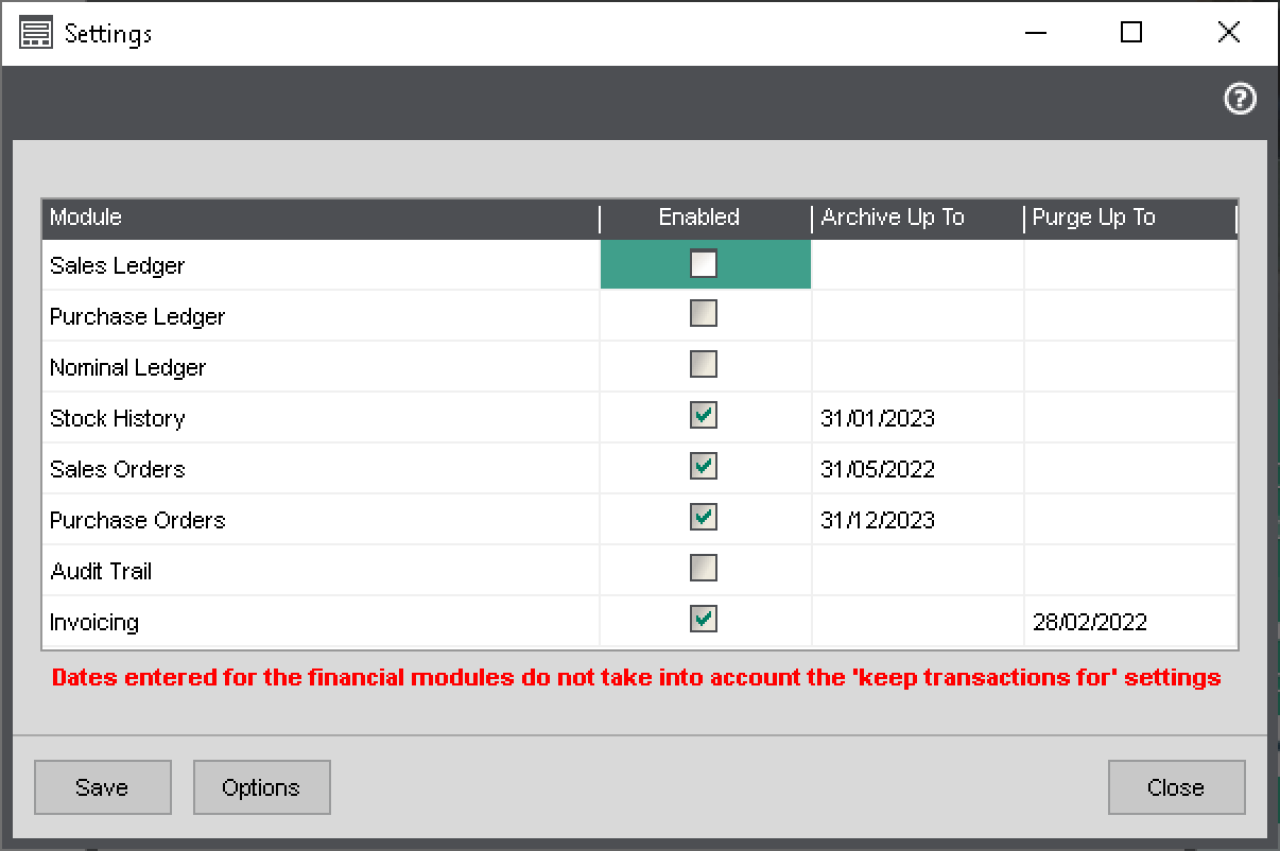
Set it and forget it
You maintain complete control over your data retention strategy by defining exactly how far back to archive and when to permanently purge data for each module, setting custom "archive up to" and "purge up to" dates tailored to your business requirements and compliance.
The system respects these parameters and executes your archiving strategy automatically during scheduled overnight runs without requiring any manual oversight or intervention.
After each archiving run detailed results are automatically sent to your designated users, providing visibility into what data was archived, any issues encountered and confirmation of successful completion.
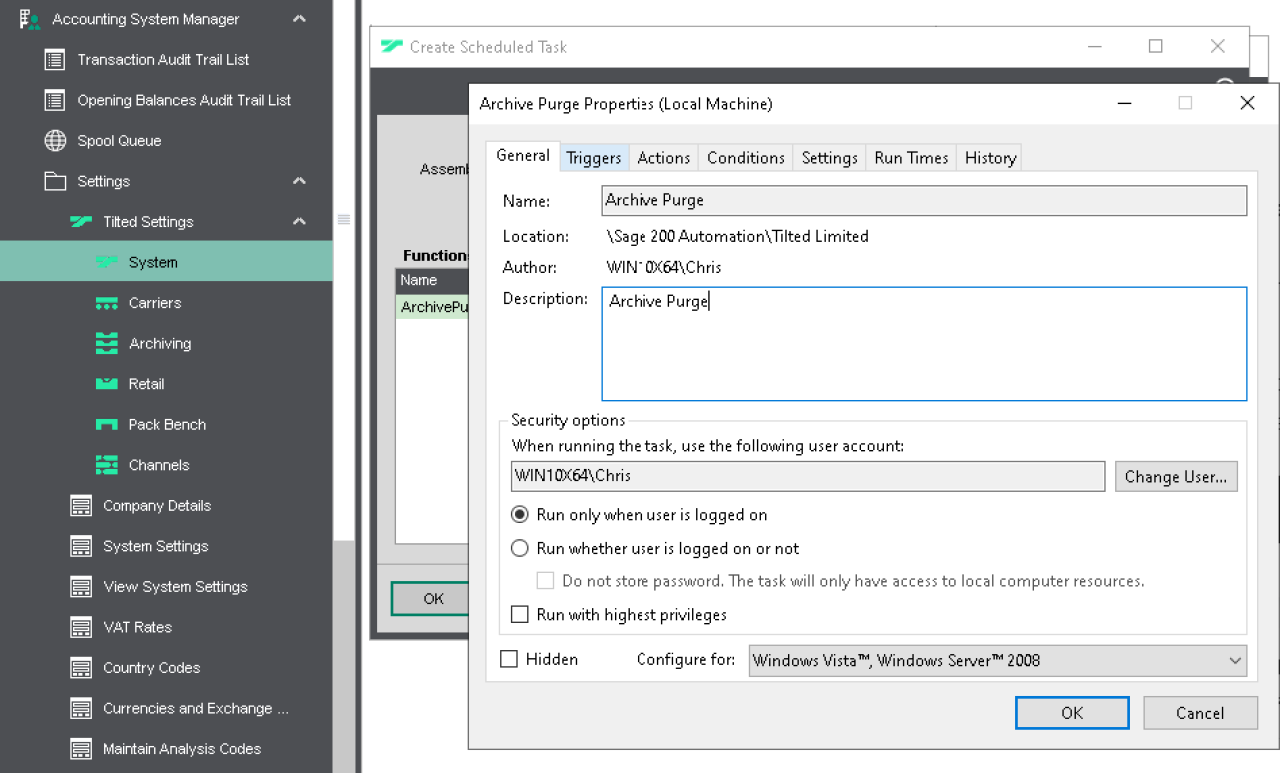
Works with your existing setup
Our Archiving solution integrates seamlessly with Windows Task Scheduler, enabling you to automate the archiving process without manual intervention. Simply configure your archiving parameters once, set your preferred schedule through Task Scheduler and the system executes archiving operations automatically at your specified times. This native Windows integration ensures reliable, consistent archiving that runs in the background during off-peak hours, maintaining optimal Sage 200 performance without requiring dedicated archiving software, complex setup procedures, or ongoing IT management.
Want to keep Sage 200 running smoothly?
FAQs
Archiving automatically removes or stores historical data from Sage 200 based on the dates and modules you define. It helps reduce database size and improves system performance.
You can choose which modules to target, including Sales, Purchase, Stock, Financials, and more. Each one can have its own custom archive or purge settings.
Yes. You can set “Archive up to” and “Purge up to” dates for each module, giving you full control over what stays and what’s removed.
No. Archiving runs outside of working hours and never interferes with your live business processes. It’s completely non-disruptive.
Yes. It’s designed to work alongside third-party add-ons and all other Tilted modules, so there’s no need to worry about clashes or compatibility issues.
Yes. After each scheduled run, a summary report is emailed to your chosen users, keeping your team fully informed.
That depends on your configuration. You can choose whether data is archived for long-term storage or purged completely. You’re always in control.
Regular archiving keeps your Sage 200 system fast, responsive, and easier to back up. It helps prevent system lag and reduces long-term data storage issues.
Not at all. Our team will handle the setup for you, help define your archive rules, and ensure everything runs smoothly from day one.
Yes. The system is fully flexible, and schedules and settings can be updated anytime as your needs change.