
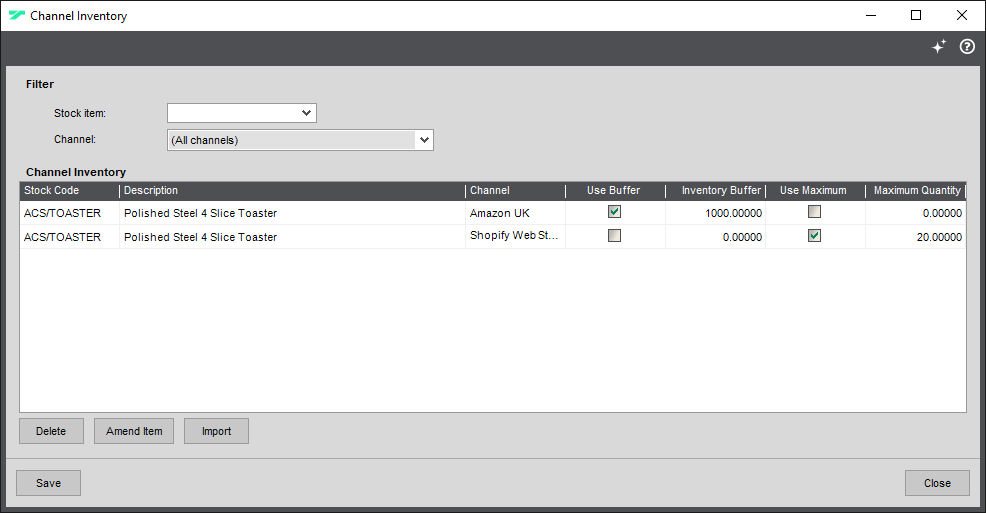
Tilted Channels now lets you set an inventory buffer and a maximum quantity for one stock item on one channel. You could hold 1000 of an item back from Amazon and never send Shopify more than 20 of it. Both cut the risk of overselling when the same stock is offered on several sites.
Tilted Channels already had inventory buffers for every channel, for one channel and for one item on every channel. The buffer for one item on one channel is new. So is the maximum quantity which can also be set for a whole channel in Channel Options or for one item on every channel.
The settings are on the stock item in Sage 200 under Channel Inventory on the item’s Channels tab and are saved with the item. Pick a channel then tick one or both of these and click Add:
- Inventory buffer is the quantity of the item held back from that channel. The channel is sent the item’s actual free stock less this figure which replaces every other buffer for the item on that channel.
- Maximum quantity is the most of the item sent to that channel. The channel is sent the lower of this figure and the stock level it would otherwise have been sent. It is used in place of a maximum set for the whole channel or for the item on every channel.
Each is used only when its box is ticked - a ticked maximum of 0 sends that channel 0 of the item. Channels you have not listed for the item use the channel’s and the system-wide settings. Show All lists the channel settings of every stock item so you can change them in one window.
The update is available now for Tilted Channels customers.